In R | Trader Pro, you can monitor your open positions from the Positions tab and close them using the red close button.
✅ Steps to Monitor and Close Open Positions
- Go to your open Client instance of R | Trader Pro.
- Click on the “Positions” tab in the upper left corner.
- In this window, you can see your current open positions.
- To close a position, click the red X. Once the position is closed, the X will turn grey.
📊 What You Should Check
Monitor
Use the Positions tab to verify whether you currently have any open trades.
Close
Use the × red X button to close an open position directly.
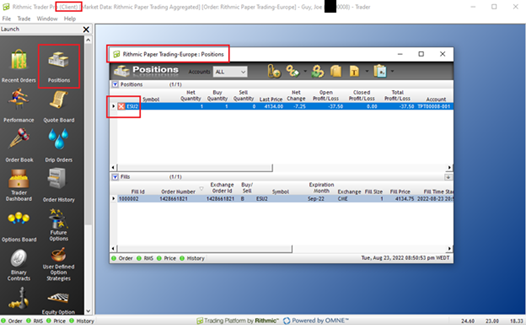
Important: Always confirm that your position is fully closed. If the close button turns grey and the position is no longer listed as open, the position should be closed.
For reference, use the screenshot above to identify the correct tab and the red X close button.
Final answer: open R | Trader Pro, go to Positions, review your open trades, and click the red X to close the position.