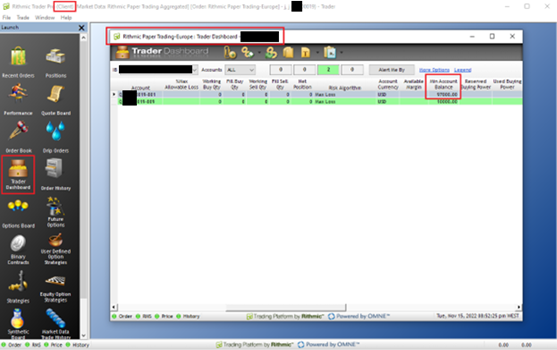
In R | Trader Pro, your current end-of-day trailing drawdown account value is shown inside the Trader Dashboard, under the Min Account Balance column.
This value represents the minimum account balance your account must stay above according to the end-of-day trailing drawdown rule.
📋 How to Find It
- Open your Client instance of R | Trader Pro.
- Click the Trader Dashboard tab in the mid-left section.
- In the Trader Dashboard window, scroll slightly to the right.
- Look for the Min Account Balance column.
The Min Account Balance column displays your current end-of-day trailing drawdown account value.
While the end-of-day trailing drawdown account value is based on your account value at 5 PM EST each day, it may take several hours to be correctly reflected in your Rithmic account. Be careful trading during this update window, because you may be disqualified if your account balance is below your new trailing drawdown account value once it updates in Rithmic.
⚠️ What to Remember
Column to check
Use the Min Account Balance column in the Trader Dashboard.
Update timing
The value is calculated around the end of day and may not update instantly.